


如何繳交學雜費教學
臺灣銀行學雜費繳費系統
Bank of Taiwan Tuition Payment System
提醒: 一般情況請在繳費截止日前到便利商店或臺灣銀行各分行繳費。
若已超過繳費截止日,仍可在開學第 4 週前盡快 到臺灣銀行各分行、ATM 轉帳或使用 Taiwan Pay 繳費, 但不能再到便利商店繳費。
若已超過繳費截止日,仍可在開學第 4 週前盡快 到臺灣銀行各分行、ATM 轉帳或使用 Taiwan Pay 繳費, 但不能再到便利商店繳費。
繳費教學 Step-by-Step
1
進入學雜費入口網
打開瀏覽器,前往「臺灣銀行學雜費入口網」。
Open the Bank of Taiwan Tuition Payment System website.
Open the Bank of Taiwan Tuition Payment System website.
2
點選「繳費單查詢」
在首頁點選 【繳費單查詢(原學生登入)】 進入帳單查詢頁面。
Click “Bill Inquire (Student Login)” on the main page.
Click “Bill Inquire (Student Login)” on the main page.
3
輸入代收類別與身分證字號
Enter the collection code and ARC number
| 代收類別 Collection Code |
111692 (繳交學雜費請一律輸入此代碼 / For tuition bill) |
|---|---|
| 身分證字號 ID Field |
可能為: ‧ 目前 ARC 號碼 / Current ARC number ‧ 舊 ARC 號碼(開頭 2 個英文字母)/ Previous ARC number ‧ 西元生日 8 碼(YYYYMMDD) / 8 digits of birthday: |
|
學號 |
你的學號。Your Student Number. |
|
識別碼 |
請將您的西元出生年減 1911 轉換為民國年生日,並在前方補 0
|
4
選擇要繳費的帳單 Choose the bill to pay
在查詢結果中勾選本學期帳單,按下 【查詢】 / 【明細】 進入繳費方式頁面。
Choose the bill of the current semester and click the button to see details.
Choose the bill of the current semester and click the button to see details.
5
產生繳費單 PDF Download the bill
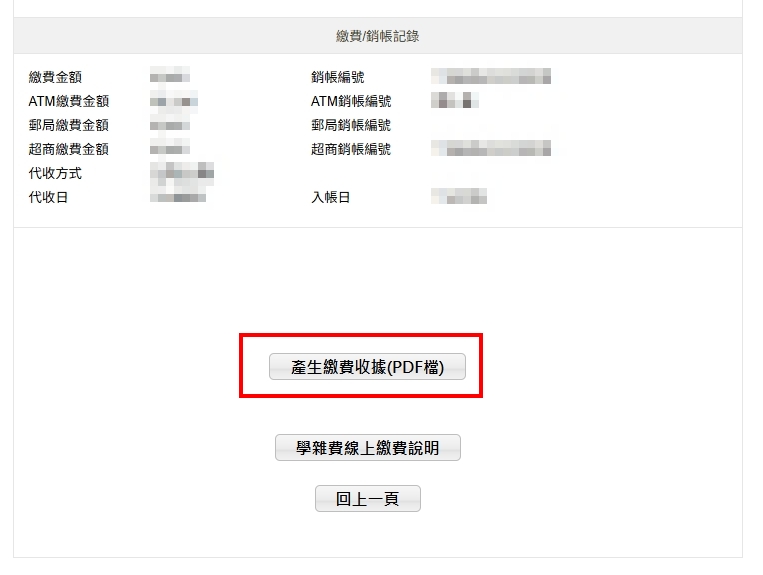
往下滑可以看到各種繳費方式,按 【產生繳費單(PDF 檔)】 下載學雜費繳費單。
PDF 開啟密碼為你登入時使用的身分證字號/舊居留證號/西元生日 8 碼。
PDF 開啟密碼為你登入時使用的身分證字號/舊居留證號/西元生日 8 碼。
Scroll down to see all kinds of payment methods, click the button to download your bill.
The password to open your bill (PDF) is the one you typed in the ID Field when logging in, could be the ARC, old ARC, or 8 digits date of birth.
6
逾期繳費確認 If the deadline has already passed...
若已超過繳費期限,系統會跳出提醒視窗,請按 【確定】 / “OK” 後再下載繳費單, 盡快依指示到銀行或 ATM/Taiwan Pay 完成付款。
If the deadline has already passed and you still want to pay the bill, please ignore all the popped up windows and click "確定" in order to reach the bill downloading section, then follow Step 5.
可以怎麼繳? Payment Methods
繳費期限內 During Payment Period
- 臺灣銀行各分行櫃檯 Bank of Taiwan Counter
- 便利商店(7-11、全家、OK、萊爾富) Convenience Store
- ATM 轉帳 ATM transfer
- 網路銀行 Online banking from Taiwan
- 臺灣發行信用卡 Credit card issued in Taiwan
- Taiwan Pay(掃描繳費單上的 QR code)
超過繳費期限 After Payment Period
請務必在 開學第 2 週前 完成繳費,否則可能視為未完成註冊。
- 臺灣銀行各分行櫃檯 Bank of Taiwan Counter
- ATM 轉帳 ATM transfer
- Taiwan Pay(依繳費單 QR code 操作)
常見問題 FAQ
Q1. 我代收類別或身分證字號一直錯,無法登入?
‧ 確認代收類別一定輸入:111692。
‧ 身分證字號欄位請依序嘗試:目前 ARC 號碼 → 舊 ARC 號碼(開頭兩碼英文字母)→ 西元生日 8 碼(YYYYMMDD)。
若仍無法登入,請截圖錯誤畫面並聯絡 OIA 承辦人。
Q2. 我超過繳費截止日才發現還沒繳,怎麼辦?
仍可在 開學第 2 週前 利用臺灣銀行櫃檯或 ATM 轉帳/Taiwan Pay 繳費。
再次登入系統確認帳單已顯示「已繳款」,並下載收據存檔。
Q3. 我是新生,想延後入學(休學),還需要先繳費嗎?
需要。完成繳費+完成選課才算註冊完成,新生若要申請休學, 仍須先完成學雜費繳費,再依學校規定辦理休學手續。
Q4. 繳完費後多久可以在系統上看到「已繳」?
‧ ATM / 便利商店:約 3–4 天。
‧ Taiwan Pay:約 5–7 天。
若超過一週帳單仍顯示未繳費,請備妥繳費收據,聯絡 OIA 或出納組協助查詢。(過年期間入帳時間將會比較晚)
Q5. 我要如何使用ATM 轉帳繳費?
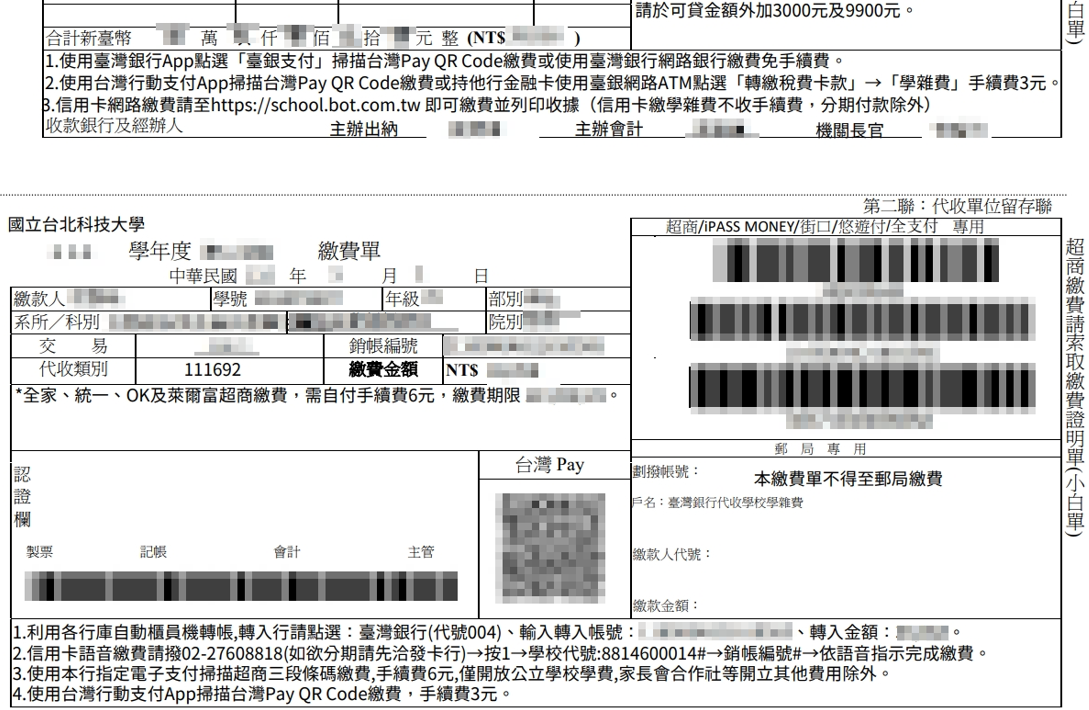
‧ 登入台銀系統後,下載學費繳費單,最下方第二聯的第一點 (1.) 顯示:「利用各行庫自動櫃員機轉帳,轉入行請點選:臺灣銀行(代號004)、輸入轉入帳號:**************** (16碼)、轉入金額:**,***。」
‧ 請前往ATM或各家銀行網路ATM,將轉入銀行、轉入帳號、轉入金額依序填入並完成匯款即可。
Q6. 我要怎麼取得繳費收據?
請於台灣銀行學雜費繳費系統完成繳費後:
-
若為銀行繳費,請等待約 3–4 個工作天
-
若為超商繳費,請等待約 7–8 個工作天
之後請重新登入台銀繳費系統,點選「已繳費帳單」,往下滑並點選 「產生繳費收據(PDF檔)」,即可下載您的正式收據。